
|
|
#431
 07-05-2012, 02:07 AM
|
||||
|
||||

Quote:
Thanks for the reply and clarification in regards the loadout screen.
__________________
Spud 

|
|
#433
07-07-2012, 01:09 PM
|
||||
|
||||
|
Yes.
1. To offset engine torque. 2. And i'm not totally sure of this one, to help a long torpedo clear the prop. (The Stuka used a trapeeze for the same reason).
__________________
 Personally speaking, the P-40 could contend on an equal footing with all the types of Messerschmitts, almost to the end of 1943. ~Nikolay Gerasimovitch Golodnikov
|
|
#435
07-07-2012, 07:10 PM
|
|||
|
|||
|
Can we fix the Japanese icons when selecting another skin than the Defaults because when I select a blank skin on a Japanese fighter like the Ki-61, then I realize a split second later, The Japanese icon that is suppose to be on the skin when you have the markings on option selected is not there. Can you fix that DT ? Just take a look on all other skins in other Japanese planes that isn't defaults including blank skins downloaded from the web and test all Axis markings and you might see the problem.
|
|
#436
07-09-2012, 01:06 PM
|
||||
|
||||
|
Was flying the Ju88 this evening testing out 6dof (5dof) mouse and keyboard when I noticed some visual glitches I'd not noticed until now regarding the pilots side and front quater window frames invollving several tears and polygons out of place as can been seen below, the area with the dashes is were the worst tears can be found:
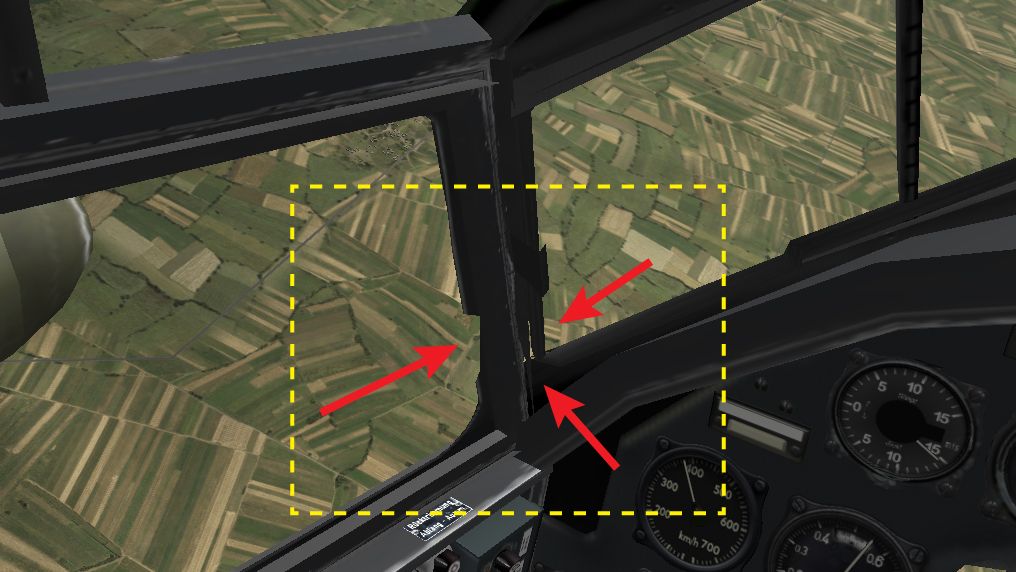 I exited and re-strated the game several times, however there was no change so I then launched my backup installation 4.11.1 which does not have any 6dof keys assigned, but the same glitches were also evident here as well. As I said I had not noticed them until today and the glitches appear on all three 88s, I do not know how long these glitches have existed as I only currently have 4.11.1 (all be it twice) installed so can not check prior releases without doing other re-installations, so does everbody else have the same glitch issues on the 88s? If so, could TD possibly take a look and maybe even try and fix the issue before the release of 4.12 (pretty please).
__________________
Spud
Last edited by Spudkopf; 07-10-2012 at 06:17 AM. Reason: more info & updated image
|
|
#437
07-09-2012, 10:00 PM
|
||||
|
||||
|
Ok I been searching Google high and low for past images of the Ju88 cockpit. And it would appear most of the frame issued mentioned above have been there for a long, long time and I have even incorrectly labelled the pilots sliding widow handle as a fault “duh”, I will have to edit my original image above to reflect these findings, yet can not access Photobucket during business hours ( can't even see my own images
 ). ). That said the tear/holes in the front pillar of the sliding widow seems not to be evident in anything that I have found thus far and is something I just can not recall ever seeing in the past. I guess once I noticed the tear which is now quite distracting my mind starting inventing other problems. For reference here are the original Ubi pages Ju88 implementation images and as you can see the previously high-lighted pillar seems to have no tears or holes in evidence.   Also, and sorry, but come to think of it, maybe this post should be in the 6DOF debugging thread instead? If so I raise it there instead.
__________________
Spud
|
|
#438
07-09-2012, 10:08 PM
|
|||
|
|||
|
While observing an Fw 189 in flight, I noticed the flaps aren't connected to the wings.
There are flaps "painted" on the underside of the wing, but they are static. The actual flaps are below these, floating in mid air. It appears both use the same texture. From what I can find, the real aircraft didn't have these offset flaps. So believe it to be a "bug" in the model. Quote:
|
|
#439
07-19-2012, 08:54 PM
|
|||
|
|||
|
Something wrong with the needle of the boost gauge in the MC.202 cockpit
Last edited by Bob_Drugstore_Arp; 07-20-2012 at 08:51 AM.
|
|
#440
07-21-2012, 09:00 PM
|
|||
|
|||
|
Error in yak-7 series!
i was just flying some russian planes in a new mission i was testing, and i came across a fairly huge bug in the yak-7 series
their center of rotation when u pull up is for some reason behind the wings whereas i would believe it should be located more forward like the picture shows please go into a yak7 (any of them all same problem), and try to pull up or do any elevator motion and notice how the plane doesnt rotate about what would be its center of lift (eg near the wings most likely above them) like all other planes, but instead rotates about a spot behind the wings also look into the plane choosing window (like advanced loadout section) and notice how it rotates about this weird spot behind the wings, while all other yaks rotate around somewhere near the wings. Although im not a expert or even any good at 3d modeling, im guessing the model's center point determined when its compiled or something determined about what spot it rotates when well rotating or pulling up/down. And the way is now just doesnt make sense. Not sure if someone compiled the center's location right or something but im guessing move it to the green area in the attatched pic i would reccomend making the yak7s act just like the rest of the yaks instead of the way they are if this is intended then just disregard this, but i do believe it is not suppost to be this way
|
 |
|
|



 Tx
Tx
 Linear Mode

