
|
|
|||||||
| Performance threads All discussions about CoD performnce |
 |
|
|
Thread Tools | Display Modes |
|
#1
 01-11-2012, 12:50 AM
|
|||
|
|||
 IL-2 Cliffs of Dover Cliffs of Dover Optimization and Performance Thread
Here is a checklist you can consider for better performance. This is meant to be a summation of information that can help you boost your performance and better understand the sim's settings.
*THIS IS A WORK AND PROGRESS AND WILL BE UPDATED WITH YOUR HELP, WILL BE REWORKED AFTER UPCOMING PATCH** Here are some notes that might help you optimize your fps or realize your capped potential. Please share your own positive feedback or experiences with performance boosts and I will update the information here. Section 1: Maximizing Your Potential Stop all of your Antivirus Software or configure an exception for launcher.exe Make sure you are malware free by using a program like MalwareBytes Stop all unnecessary background programs like your browser, media player, flux, etc. Test the competency of your system by testing with 3DMark Vantage Section 2: Understand and Maximize the Capabilities of Your Hardware Note that the sim is highly dependent on your video card. Simmers with with modern 1GB+ VRAM and PCU 3GHz+ are getting the best results. (Both benchmarks are now considered low end!) Check the status of dust in your box! When is the last time you checked?! Monitor temperatures of your GPU with a program like GPU-z if you experience freezing Update and Test the latest Video Card Drivers An SSD drive can boost performance. Section 3: The Video Options Screen Settings 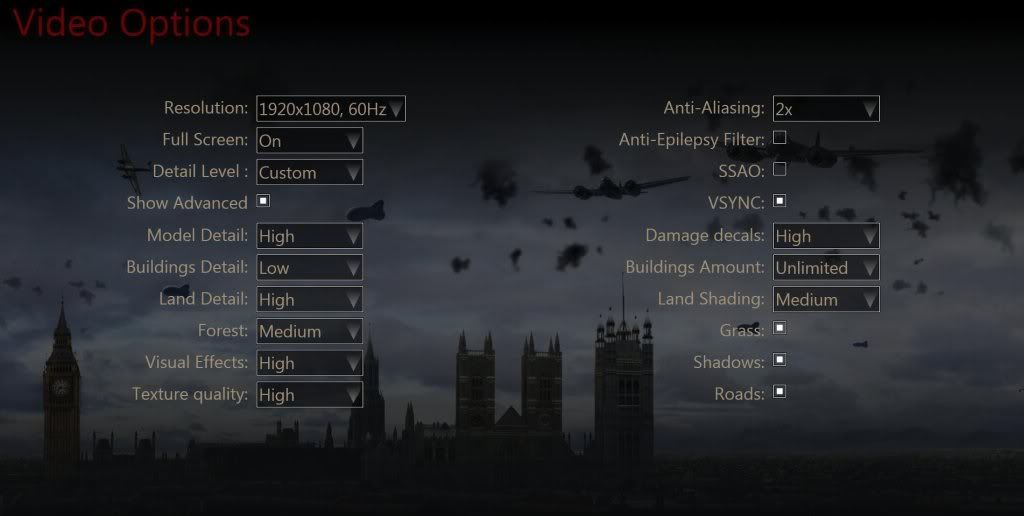 Resolution-Check that you match your native screen resolution and refresh rate. Full Screen- Detail Level- Model Detail- Buildings Detail- Recommend Low setting and wait for future advances unless your doing some ground filming Land Detail- Texture Quality- Players have reported a performance boost after setting Texture quality to HIGH from Original. Huge on performance, but also the sexiest setting. To go Original (which is also the highest setting), you should have a 1.5GB VRAM video card. High I would recommend a 1GB+ VRAM video card. Forest-has a huge effect on performance. Medium seems to be the sweet spot for 1GB+ Video cards Buildings Amount-seems to effect the rendering of buildings at a distance. In my experience, setting this lower will cause buildings to look like legos until they render. I set it to Unlimited and they render great now. This is my experience only Land Shading-on the ground/trees is not perfect as of yet. For best results, set your fly-times to morning or late afternoon, not high noon. Doesn't seem to do much for tweaking Anit-Epilepsy Filter- Disable (at your own risk) Anti-Aliasing- works best at 2xAA for most everyone. Higher setting do not affect rendering, but may inhibit your performance. Also consider FXAA with this setting disabled SSAO- Disable and wait for future improvements VSYNC-Check to sync your frames with monitor's refresh rate. A personal preference based on your hardware. Damage Decals- Grass-- Can be big on performance +/- 5FPS, but looks awesome Shadows-This is the awesome cockpit shadows. Can be big on performance +/- 5FPS, but looks incredible Roads-Can be disabled if you have a low end rig and want to see what it looks like without roads vs. your improved performance Section 4: Other Options for Performance Boost FXAA :There is a new AntiAliasing method out by Nividia called FXAA and it works with IL2 CloD using Nvidia Beta drivers 301.24: Nvidia Beta drivers 301.24, FXAA works in CloD If you want to try another method, place these 3 Dx10 files into your root or main folder with the launcher.exe in it Also, you can consider disabling AA in game if you use FXAA. Here are the files : http://forum.1cpublishing.eu/showthread.php?t=25281[/quote] 4/12: This information is outdated, but will still work if you do some digging for files. If you did use this method, don't forget to remove the files dxgi, fxaa3_10.h and shader10.fx Section 5: More information to consider ATI owners: Disable the Ubisoft intro video by renaming it to anything. *Get rid of the opening ubisoft splash screen for faster load times and potential issues with crossfire/sli In your Steam folder, go to "SteamApps\common\il-2 sturmovik cliffs of dover\parts\core\GUI". Rename "Logo.wmv" to any random name and it wont appear anymore *Disabling your rear-view mirror can dramatically help frame rates on takeoffs and landings. Since the mirror has not reached its full potential, I disable mine with good results. (instant +10FPS!) *Reinstalling The Game after the latest patch has proven to be a performance booster. *SLI can actually be an improvement for some, a detriment for others. However, the sim is not officially supported yet. Section 6: Benchmarking When benchmarking, I would highly recommend testing your FPS and performance in cockpit and not on the black death track. After all, you're going to be in cockpit, not running a track when you are flying. For an on screen FPS monitor while testing, open the console and type: Quote:
This is a work in progress guide. I'm starting out with some quick notes, but I'll organize, add links and screenshots with your help and feedback. Please use this as a suggestion and feedback forum to help improve our performance. Feel free to add or correct so I can update the bullet points and we can help each other maximize performance. Re: Studders From JTDawg at ATAG Hey Guys, Got 2 things worked like a charm, no stutters , no slide show for ati an nvidia users . Win7 USERS .1 click START ^ Control panel ^ Programs ^ Programs an Features Go to Microsoft. NET Framework 4 Client Profile. double click on it , An repair it , After repair it will ask restart your computer, do it .2 Then go to C PROGRAM FILES X86/ Steamapps/common/il-2 sturmovik cliffs of dover/redist/DirectX/ Scroll down til you see DXSETUP Double click on it , an run it!! Last edited by katdogfizzow; 03-29-2013 at 04:27 PM. 
|
|
#2
01-11-2012, 06:37 PM
|
|||
|
|||
|
Just wanted to say I just switched over to these settings. They made a big difference. I have much less stutters when flying over land now. Less building pop up as well too.
The one thing that kills it for me though is the terrain and building shimmering. I can't stand this. Once they get some AA working in this game it will be KILLER. I'm not too big into using the 3rd party AA but from what I have seen that helps but I'll wait for the real thing.
|
|
#3
01-14-2012, 05:24 PM
|
|||
|
|||
|
My old performance tips can be found here http://forum.1cpublishing.eu/showpos...4&postcount=13
Quote:
Last edited by Ataros; 01-14-2012 at 05:27 PM.
|
|
#4
01-16-2012, 02:38 PM
|
|||
|
|||
|
Yeah I can't believe how much better my system runs CloD now after these tweaks. Before I was using all high and med settings, but it looks like I had a few things on high that should of been on med. And building amount set to unlimited sounds like it would be bad but in fact it actually helps.
I also did the splash screen trick and I'm sure helped as well. I get very smooth fps when flying even over land at altitude, when flying low on the coast it drops a bit but most of the stutters are gone so it feels much better. Flying through London low is still a chore but at least it's more smooth. Time of day makes a huge difference. I still just enjoy flying around casually in this sim, learning CEM and sight seeing. When flying at dawn or dusk the shimmer seems to be reduced and the light is very nice.
|
|
#5
01-19-2012, 03:10 AM
|
|||
|
|||
|
Freeze/Crash/Launcher error?
[QUOTE=katdogfizzow;378231]Here is a checklist you can consider for better performance. This is meant to be a summation of information that can help you boost your performance and better understand the sim's settings.
*THIS IS A WORK AND PROGRESS AND WILL BE UPDATED WITH YOUR HELP** Here are some notes that might help you optimize your fps or realize your capped potential. Please share your own positive feedback or experiences with performance boosts and I will update the information here. Question.....You did not say it but are you saying you are not experiencing freezes/crashes? If you do experience freezes/crashes...How long can you run before it happens?
|
|
#6
01-21-2012, 08:47 PM
|
|||
|
|||
|
the FXAA link no longer provides a valid file unfortunately...
is SLI still coming to this game??? one GTX460 is not enough to handle this game with the visual affects on medium, and without it it looks poor, as do all the other settings
|
|
#7
02-07-2012, 08:29 AM
|
|||
|
|||

Quote:
IMHO not sure why you have probs with it,, I am not sure if my computer profile is on this forum but it's no super computer, and I have everything on medium, except I think the shows are turned down.. 3 ghz core2duo cpu, MSI Nvidia P7n motherboard , 4gb ddr2 ram, Win7, PNY GTX460 video with 1 gb ddr5 ram and 256 bit ., 500 gb hard drive space.. I have cable Internet RoadRunner isp.. I run Black Shark, IL-2, IL-2 COD, A-10C, Stalker,, Saitek X52 Pro and pedals.. == note: the sound is not even, I don't hear the aircraft engine at idle, but so far that's my problem I am trying to adjust.. I have to give it throttle to hear the engine... once that is fixed, it's pretty good, then the ghos tplanes need to be fixed.. no more ghosts.. IMHO
__________________
ASUS P8Z68 V Pro Gen3 Intel i53570K 3.40 GHZ G.Skill F3-17000CL9-8GBXM EVGA Nvidia GTX 680 Video Graphics ard WD Black WD1002FAAEX 1TB Cooler Master HAF 922 Corsair Enthusiast Series TX650 V2 650W 46" Samsung LCD HDTV Win8 x64 Last edited by ramstein; 02-07-2012 at 08:32 AM.
|
|
#8
02-19-2012, 05:38 AM
|
||||
|
||||
|
And, I found that enganging the AutoPilot will boost the FPS on my PC about 15 or more...
|
|
#9
02-19-2012, 06:39 AM
|
||||
|
||||
|
A few quick things... For NVIDIA users, that update their drivers. When you stall your drivers, the first thing you need to do is go into the control panel and set them to single display mode. They default at multi gpu setting . Like were all running sli or crossfire setups. This will give a decent performance increase.
I also found the shimmering bad.. I went in the config file in the 1C documents folder.I set Drawifnotfocused=0 to 1. I didn't see a hit in frames, and it seemed to reduce the shimmering quite a bit. I also don't notice the constant draw in circle that is around the aircraft. Possibly helped with studdering. I'm not saying this is the HolyGrail of tweak.. but it seemed to work well for me.. give it a shot and report your results..  Oh.. and Im also running the Gtx 460.. but its the 2gig version running at 800 Hz.. 
__________________
 352ndRibbs 352ndRibbs Windows 7 Home Premium 64-bit/AMD Phenom(tm) II X4 B50 Processor (4 CPUs), ~3.3GHz/NVIDIA GeForce GTX 460 2gig/8gigs of RipJaw 1600 Last edited by Ribbs67; 02-19-2012 at 06:44 AM.
|
|
#10
02-24-2012, 03:28 PM
|
||||
|
||||
|
Hi everybody
the FXAA pack is still here http://www.mediafire.com/?9by0ddpvv62uzd1 It can boost AA even on my old nVidia8800 512MB  --- greetings Latware Last edited by latware; 02-24-2012 at 03:31 PM.
|
|
|
|




 Linear Mode

