
|
|
#1
 01-01-2012, 05:52 AM
|
|||
|
|||
 Go Flight Controllers
Cliffs of Dover is being set up as the foundation of a series of flight sim over many years.
Already included in the sim is provision for multi engine bombers 4+ That means a lot of switches and controllers to fly multi engine bombers. Even the single engine fighters have a lot more switches that have to be controlled. 1c needs to add the Go Flight range of flight sim controllers as being useable as both keys and axes. It will be the only way to control so many actions in each aircraft. Currently im using the following. Saitek EVO FFB joystick CH Pro Throttle CH Quadrant Throttle CH rudder pedals. Track IR4 Windows 7 Ultimate 64 bit Version 6.1.7601 Intel i7 2600K @3.4Ghz 4 cores RAM 16GB All USB connected via powered hubs or direct to machine. I decided to add some Go Flight components. Quote:
Cliffs of Dover doesnt recognise the Go Flight Components. On The go Flight Web Site it says. If the software developers have not provided key maps/APIs to enable for their various unique functions, there are three suggested resolutions we can offer: Convince the aircraft vendor/developer to develop and publish their key maps (like Level-D, PMDG, Wilco, X-Plane currently do). Learn and use FSUIPC or a key mapping program to enable your desired set of functions for a particular aircraft. Have GoFlight Technologies perform custom development at some agreed upon cost paid for by the requester or a third party. Id appreciate feedback by 1C whether they will provide this information, so Go Flight Modules can be used. In the mean time i looked at using the Key Map as a work around . On the Go flight web site it says. If you're a fan of programs such as Falcon 4, IL-2, LOMAC, or any of the leading racing sims, you'll really appreciate GFKeys. In fact, ANY software that accepts commands from the keyboard can be controlled using GFKeys. I used the Go flight Key Mapper. It recognised all 3 components. I mapped a number of buttons on all three components. I ensured that the GFKeys programme recognised the components which it did. I setup and mapped the keys. I tested that the key mapped worked in game. But it doesnt work in Cliffs of Dover. Individually the mapper works and records the key strokes. Using those same keys in Cliffs of Dover works - eg using the actual keyboard keys will work. But using the Go flight components with the mapper wont control the game. If anybody reckons they have this working id be interested to hear from them. In the mean time I strongly urge 1C to incorporate these controllers into the game as standard peripheral devices. Last edited by RAF74_Taipan; 01-01-2012 at 05:57 AM. 
|
|
#2
01-01-2012, 08:41 AM
|
|||
|
|||
|
I am not sure I understand correctly Taipan,
You say that your operating system recognises these controllers. Good! Also the rudder, elevator and aileror trims are recognised by your system? As joystics? With Axis? Then CoD should be able to use them. Another question: Does any other game you have on your PC recognise these controllers???? ~S~
|
|
#3
01-01-2012, 10:48 AM
|
|||
|
|||
|
Yes my other controllers are all recognised by COD.
They are CH Throttles, CH Quadrant, CH rudder Pedals, and Saitek Joystick. COD doesnt recognise anything from the Go Flight range. The computer recognises that the controllers are there. But my computer only recognises the CH and Saitek Joystick as game controllers. The go flight modules are recognised as "unspecified" usb devices. Ive been able to find no specific drivers for them - as yet.
|
|
#4
01-01-2012, 10:59 AM
|
|||
|
|||
|
After mapping a keystroke in GFKeys try and re-map the keystroke in-game, but when the game asks you to press a button, press it on the controller (not your keyboard)... Maybe it will pick it up that way.
2nd guess - try elevating the GFKeys program to admin privilages. Good Luck - awesome looking controllers. 
|
|
#5
01-01-2012, 11:27 AM
|
|||
|
|||
|
Does anybody know whether there is extra drivers for these devices. Ive looked for hours and cant find anything. (No disc either). Secondly the two progams i did download were
GFconfig Version Version 2.03 Build 1. Absolutely useless unless you want microsoft flight sim. However this certainly recognises the 3 components. The other program was GoFlight Key Mapper Version 1.5 Build 83. Again this recognises the 3 components. Select a control and that controls light will blink. You can then easily "set keys" using the keyboard.  Here is the GF RP48 .gfk file (mapping file"). [GFRP48_1] K1+=LSFT+AUXHOME K1+D=Gyro Compass K1-=LSFT+AUXEND K1-D=Gyro Compass K2+=LSFT+AUXINS K2+D=Course Setter K2-=LSFT+AUXDEL K2-D=Course Setter K3+=LSFT+AUXUAROW K3+D=Sight Distance K3-=LSFT+AUXDAROW K3-D=Sight Distance K4+=LSFT+AUXLAROW K4+D=Adjust Sight Left K4-=LSFT+AUXRAROW K4-D=Sight Adjust Right S1+=TAB+LCTL S1+D=Send Message S1-= S1-D= S2+=LCTL+Q S2+D=Flash Net Stats S2-= S2-D= S3+=` S3+D=Toggle Net Stats S3-= S3-D= S4+= S4+D= S4-= S4-D= S5+= S5+D= S5-= S5-D= S6+= S6+D= S6-= S6-D= S7+= S7+D= S7-= S7-D= S8+= S8+D= S8-= S8-D= And the same in the options section in the cliffs of dover. 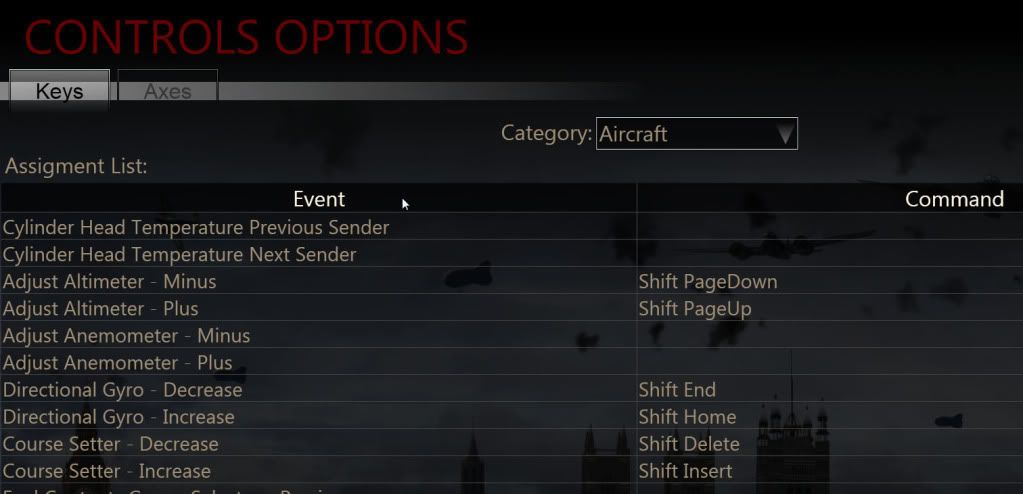 And the actual from the ini file. Just the important section [HotKey pilot] Joystick3+Key1=trigger1 Joystick1+Key1=motorcomp_stop Joystick+Key1=wheelbrakex Joystick1+Key8=aileron_0 Joystick+Key15=uc_up Joystick3+Key0=trigger0 Joystick1+Key0=enginei01 Joystick1+Key7=mag0_on Shift R=ruddert_left Shift G=site_dimmer Shift E=elevatort_nup Joystick1+Key6=elevator_0 Joystick+Key13=uc_down Shift A=aileront_left Alt R=ruddert_right Joystick1+Key5=oilrad_minus Joystick+Key5=MouseControl Shift Insert=peilzeiger_p Alt E=elevatort_ndown Joystick1+Key4=oilrad_plus Shift Down=site_dist_minus Shift Right=site_side_right Alt A=aileront_right Shift Up=site_dist_plus Joystick+Key11=thtl_wep Shift Left=site_side_left Shift Home=directionindi_p Shift End=directionindi_m Shift PageDown=altimeterknob_m Shift PageUp=altimeterknob_p Shift Delete=peilzeiger_m Joystick+Key3=wheelbrakeltx Joystick1+Key10=rudder_0 Joystick1+Key2=tankselector0 Joystick+Key2=wheelbrakertx Joystick1+Key9=mag1_on I have also sent an email to go flight, and posted on their forum which at this moment over the xmas period silent. I did notice this. for K1+D=Gyro Compass K1+=LSFT+AUXHOME and Shift Home=directionindi_p Last edited by RAF74_Taipan; 01-01-2012 at 11:31 AM.
|
|
#6
01-01-2012, 11:50 AM
|
|||
|
|||
|
Taipan
The only devices from GoFlight that will be recognised as individual controllers in CoD are the following: GF-TQ6 (throttle quadrant), GF-TPM(throttle-Prop-Mix) and the GF-Rudder pedals (discontinued) maybe another with axes controls that I cannot remember. However, all the rest need to be used through the keymapper utility and will function inside CoD I have the same software versions and using: GF-TQ6 GF RC GF-TPM GF-RP48 x 2 GF-T8 GF-LGT GF-SECM It would have been nice if the above where coded to be recognised as individual controllers but for the time being the keymapper does the job. Last edited by KDN; 01-01-2012 at 03:06 PM.
|
|
#7
01-01-2012, 10:12 PM
|
|||
|
|||
|
So KDN you map it all up using the Key mapper and then what do you do?
Id even accept the key mapper until something better is done. Am i missing something here?
|
|
#8
01-02-2012, 11:07 AM
|
|||
|
|||
|
Once you mapped your controllers through the keymapper, make sure it runs in the background, open up your CoD and put the same keys on the Contols section. Best to use the GF cotrollers to activate the mapping on your CoD controls section.
The keymapper utility needs to be active in the background for any on your toggels and switch to put out a keyboard character. I works ok but sometimes the utility stops working, especially when I switch interface (picking up anohter plane or alt tab, or windows key usage or even moving from the main interface to the FMB). On occasion it happens after long flights but I cannot reproduce the situation. It seems random. When it the utility stops responding and you go and open it again it looks that all the keys are lost. This is not true. Shut the utility completely and restart it and you will see all your keys appearing again. However, do back up your keymapper files, just in case.
|
|
#10
01-02-2012, 11:53 AM
|
|||
|
|||
|
you could buy it here: http://www.fspilotshop.com/index.php...acturers_id=66
or you build your own one... 
|
 |
|
|


 Linear Mode

