
|
|
|||||||
| Technical problems and solutions Armored Princess questions and solutions |
 |
|
|
Thread Tools | Display Modes |
|
#1
 04-13-2010, 06:00 PM
|
|||
|
|||
 Does 1280x768 also have black bars?
Hi.
Can someone please let me know if 1280x768 resolution also has the black bars on right and left side of the screen? I know 1280x720 has black bars and 1280x800 doesn't... ... but what about 1280x768? Hmmmm... really would like to know as that is my monitor's native resolution. Much appreciated! 
|
|
#2
04-13-2010, 07:27 PM
|
|||
|
|||
|
Are you sure you are looking for info on resolution 1280x768 and not 1365x768 (16:9 aspect ratio) or 1024x768 (4:3 aspect ratio)? Below are the resolutions and related aspect ratios that I know of:
List of 4:3 Monitor Resolutions Resolution - Aspect ratio 640x480-----4:3 800x600-----4:3 1024x768-----4:3 1152x864-----4:3 1280x960-----4:3 1400x1050-----4:3 1600x1200-----4:3 2048x1536-----4:3 3200x2400-----4:3 4000x3000-----4:3 6400x4800-----4:3 List of 16:9 Widescreen Resolutions Resolution - Aspect ratio 852x480-----16:9 1280x720-----16:9 1365x768-----16:9 1600x900-----16:9 1920x1080-----16:9 List of 16:10 Widescreen Resolutions Resolution - Aspect ratio 1440x900-----16:10 1680x1050-----16:10 1920x1200-----16:10 2560x1600-----16:10 3840x2400-----16:10 7680x4800-----16:10 We can't really check for you if there are black bars or not since it really depends on your display, and we may have different displays. Check your display's aspect ratio (4:3, 16:9, 16:10) and max resolution settings, then cross-check the appropriate resolution settings for it. If you use a resolution setting that does not match your aspect ratio, then you will definitely get black bars on your display's borders.
|
|
#3
04-13-2010, 08:24 PM
|
|||
|
|||
|
Thanks for your reply.
Actually I'm not so worried about the black bars, but am worried about this effect... 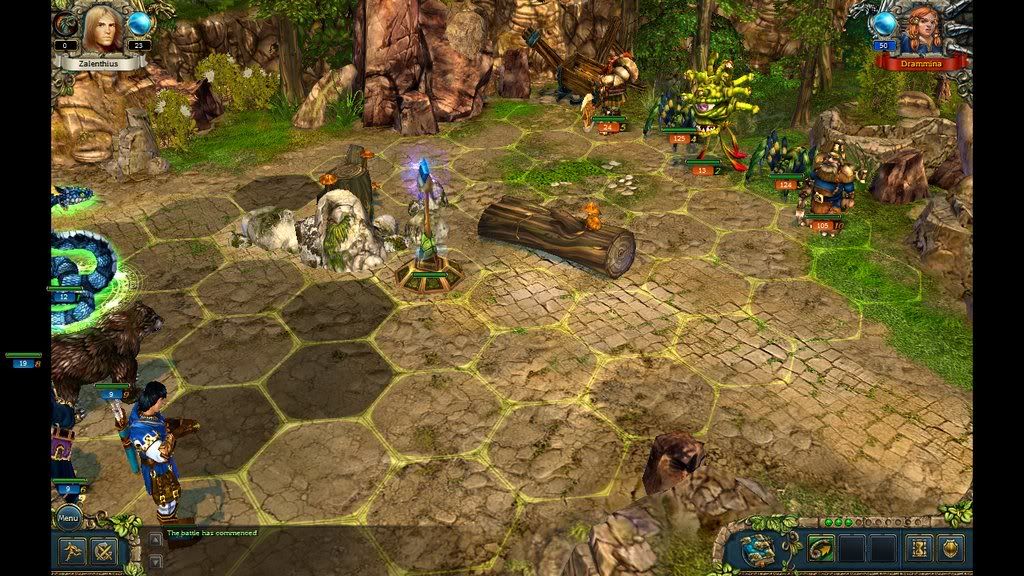 That floating green bars in black space might be just weird enough to be distracting. I really hope that it will be corrected in a patch.
|
|
#4
04-13-2010, 10:25 PM
|
|||
|
|||
|
Hmmm... I'm guessing you have chosen 1024x768 (4:3 aspect ratio) in the video options in KBAP, and that you have a 16:9 or 16:10 widescreen display.
You usually get these display errors on the side borders when you choose the 4:3 non-widescreen resolution while using a display that is widescreen. Try choosing in KBAP video options a 16:9 or 16:10 resolution (see original list I posted).
|
|
#6
06-11-2011, 04:44 PM
|
|||
|
|||
|
to remove the black bars on any game
i only know how to fix it only for ATI cards, Nvidia might have the same option anyway open ATI CCC Go to---> my built in displays--->proprieties (built in display)---> and click on full screen i hope it fixes it 
|
|
#7
09-07-2011, 01:33 PM
|
|||
|
|||
|
Any new with this issue?
I've got ati hd5650. Tried this M$ link with no luck! http://answers.microsoft.com/en-us/w...1-21deed2c6c2a Anybody knows if is planned a patch to solve this issue? Thanks in advamce
|
|
|
|


 Linear Mode

