
|
|
|||||||
| Men of War: Red Tide Stand-alone expansion to its critically acclaimed RTS Men of War |
 |
|
|
Thread Tools | Display Modes |
|
#11
 12-06-2009, 05:15 PM
|
|||
|
|||
 Help
Help
I did what your instructions said but when i go into the mods options on Men Of War the mod doesn't appear there. Help?

|
|
#12
12-07-2009, 02:50 AM
|
|||
|
|||
|
Quote:
Folder = Red Tide mod {mod {name "Red Tide mod"} << same name as folder. {desc "Red Tide's content"} << This is just a description, can be whatever. } OR Is your mod.info a text document? When you are in explorer, in detail view, does it say Text Document under file type? If so, you need to go to Tools -> Folder Options -> View and uncheck "Hide extensions for known file types" and rename the mod.info.txt to mod.info Hope that helps! Deafening
|
|
#13
05-14-2010, 08:33 PM
|
|||
|
|||
|
Ok, created the folder and mod file, moved the stuff i was supposed to move and i get the error message below when i try and load the mod
 Any ideas? Any ideas?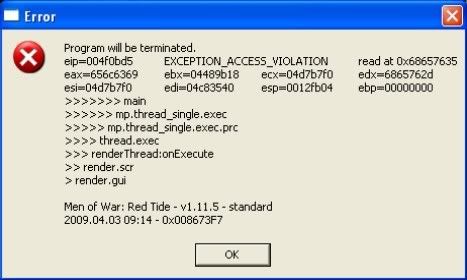 <P.S> Tried it with a fully updated install 1.17.5 and the vanilla install both with same result. Last edited by Hellhound_Uk; 05-14-2010 at 08:35 PM.
|
|
#14
05-16-2010, 09:51 PM
|
|||
|
|||
|
When I first used the mod, I used Standard RT and 1.13 MoW. The new patch must have something to do with it.
|
|
#16
09-25-2010, 06:22 AM
|
|||
|
|||
|
Nope?
Quote:
1) There is a Red Tide mod already out, which gives us the Red Tide units in Men of War (not the maps, though). See the DMS forum for this. 2) If you want to use the Red Tide units (and maps) in the GEM editor for mission making or video making, you can just copy and paste the mow_editor.exe into your Red Tide's root folder, and you will have the Red Tide version of the GEM Editor. Just don't release missions made on Red Tide maps - for common sense reasons. Cheers, anyway, Kage
|
|
|
|


 Linear Mode

