
|
|
|||||||
| IL-2 Sturmovik The famous combat flight simulator. |
 |
|
|
Thread Tools | Display Modes |
|
#1
 05-01-2016, 10:00 PM
|
||||
|
||||
 New over spec'ed rig stutters????
G’day all
My old desktop turned up its heels some 12 or more months ago with some major OS related issues, so I’ve had to be content with using the laptop and a keyboard to get my regular Il2 46 flying fix (if you can call using the keyboard flying that is). And I’ve spent the last couple of 3 months totally rebuilding the desktop rig with the following: Gigabyte Z97X Gaming 3 motherboard Intel i7 -4790 CPU Samsung 850 EVO 500GB M.2 SSD as the primary boot drive (C: drive, this also is where Il2-46 lives) Samsung 850 EVO 250GB SSD as the secondary "simming" drive (G: drive, BoS, CoD have been installed here). Western Digital 1TB Black as primary storage drive (H: drive, this drive was reformatted from old rig) Gigabyte GTX 750 2.0 GB DDR5 Kingston HyperX Fury 16GB (2 x 8GB) DDR4 Ram Coolermaster 700 W power supply I made sure the rig was stably running on Windows 7 64x pro for about a month with minimal installations (CS6, Google Chrome, 7Zip, etc) just to make confirm that everything worked as advertised. Once satisfied with this I then upgraded to Windows 10 again running the rig for about a month to ensure everything was still OK. So during the previous weekend before the one just gone I moved Il2-46 onto the new rig and flew around a bit (again only with the keyboard) and things seemed to be fine. So this weekend I pulled out all the stops and re-installed my CH stick, throttle and rudders and after some initial teething issues got them operating back to more or less where I had them on the old rig. (I'll need to make an edit and add the spec's for the old rig here for comparison when I get home) Now on paper the new rig spec’s should not even break a sweat running Il2-46, but I am noticing some very significant stuttering (4.13.1 QMB - Do335 v13, Slovakia Summer, Target = Bridge, Weather clear, just me no other aircraft) even though I’m using the same settings (conf.ini, NVidia, in game – maxed out) that worked pretty well stutter free on the old rig. I then re-installed Il2-Cod (now with all the TF stuff) and Il2-BoS, just to see how these sim’s performed and they seem to be as smooth as silk. I went online to read through some related conf.ini threads on various forum sites and made the odd tweak here and there, like forcing the game to use the one core, and some other tweaks that to me were downgrades to what I already had, but thus far nothing seems to work, I even set the NVidia setting back to default just to see what happens, but this just made the stutters even worse, out of interest I switched to Direct X and all the stutter was gone. One thing I have not tried is to try and fly Il2-46 from the G: drive to see if it is any different. I’m at work now so do not have access to either my current conf.ini or NVidia settings, but does anyone have any suggestion as to where I should focus my attention or can point me to an appropriate discussion as to how to fix this? Needless to say I'm a bit bummed out after having waited so long to get my Il2-46 rig finally back up and running.
__________________
Spud 

|
|
#2
05-01-2016, 11:35 PM
|
|||
|
|||

I'm betting is video card related. Especially after you said using the default nVidia settings made it worse.
Is the GTX 750 new or did that come from the old system? It's a little lower powered but it should manage IL-2 1946 no problem (you say it does BoS just fine anyways  ). ).In the nVidia control panel setup a custom set for IL-2 1946.exe.
See if that helps. Basically IL-2 is a very old game using OpenGL (even in Direct3D mode - turn that off BTW... go back to OpenGL), and it doesn't understand or work with some of the optimization and power controls that modern GPUs have. It has a terrible time with some of the modern antialiasing too. Go full out 8x AA but don't do anti aliasing transparency (that'll choke on clouds and fences in IL-2 for example) or anything fancy.
__________________
Find my missions and much more at Mission4Today.com
|
|
#3
05-02-2016, 12:37 AM
|
||||
|
||||
|
Quote:
Thanks for the quick response, the GTX 750 was purchased some 8 months ago as part of the stock for upgrade, I would prefer to have get a GTX 950, but I had to cut build costs somewhere, so this is probably the weakest part of the whole build, yet having said that the GTX 750 should still be much better that than the old (and now W10 unsupported) Gigabyte 9800GT 1GB card that was in the old rig build. The only reason I switched to Direct X was to confirm whether the issue existed across both Dirext X and Open GL platforms, as part of the fault finding process . I’ll give your suggestions a go and see if this fixes things. I’ve also found a thread over at SAS “Smooth, Stutter-free visuals in Il-2 with no screen tearing” for machine with very similar GPU, CPU, SSD and RAM spec’s and I have asked the author if he can send me his conf.ini and Nvidia settings as a further avenue into fixing this problem.
__________________
Spud
|
|
#4
05-03-2016, 01:57 AM
|
|||
|
|||
|
Have you tried a map other than Slovakia? It's pretty system-intensive and some areas on my rig (mainly Trencin and Bystrica) end up with some huge framerate drops, which is a shame because it's a really pretty map.
As IceFire said though, OpenGL has really fallen behind DirectX through the years and it really suffers, but I guess that's the price we pay for the perfect water 
|
|
#5
05-03-2016, 05:30 AM
|
||||
|
||||
|
Quote:
As I was able to fly this map on my old rig virtually stutter free, the problem must be either in the conf.ini or within the Nvidia settings or a mismatch between the both, I even used to be able to do this with the Nvidia settings set to the default, something I can no longer do now. I did try out IceFire’s suggestions but these had no discernible effect, leading me to further believe the conf.ini may be the culprit. So I tried running another copy off the dedicated simming SSD, which turned out having a different conf.ini as it was strangely set to a resolution of 640x480, not sure but the stutter seemed to be almost gone , so I quickly changed the res’ back to 1920/1080 in notepad then relaunched, but as I could only go for a very short flight as it was getting very late and I was well overdue for hitting the hey at that stage, I’ll need to go for another flight this evening to confirm any change in the stutter status. What I think I need to do is get a fresh copy of a conf.ini that is optimised for best graphics results and see how this goes, as maybe I have an incomplete or conflicting set of flags somewhere. On a parallel subject, where do I find the key assignments and are these able to be edited outside of the sim in notepad or another text editor? As I’d like not to have to manually reassign the controller buttons if I can at all help it.
__________________
Spud
|
|
#6
05-05-2016, 12:14 AM
|
|||
|
|||
|
Hi
Here's my config.ini open GL settings that work in-conjunction with NV Control panel settings I have tweaked just right for performance and eye candy. Firstly if you have issues with these settings then somethings wrong with either the NV control panel settings or the power supply to the GPU is insufficient for the card. Have fun and remember to back up your old conf.ini settings. [Render_OpenGL] TexQual=3 TexMipFilter=2 TexCompress=0 TexFlags.UseDither=1 TexFlags.UseAlpha=0 TexFlags.UseIndex=0 TexFlags.PolygonStipple=1 TexFlags.UseClampedSprites=0 TexFlags.DrawLandByTriangles=1 TexFlags.UseVertexArrays=1 TexFlags.DisableAPIExtensions=0 TexFlags.ARBMultitextureExt=1 TexFlags.TexEnvCombineExt=1 TexFlags.SecondaryColorExt=1 TexFlags.VertexArrayExt=1 TexFlags.ClipHintExt=0 TexFlags.UsePaletteExt=0 TexFlags.TexAnisotropicExt=1 TexFlags.TexCompressARBExt=1 TexFlags.TexEnvCombine4NV=1 TexFlags.TexEnvCombineDot3=1 TexFlags.DepthClampNV=1 TexFlags.SeparateSpecular=1 TexFlags.TextureShaderNV=1 HardwareShaders=1 Shadows=2 Specular=2 SpecularLight=2 DiffuseLight=2 DynamicalLights=1 MeshDetail=2 VisibilityDistance=3 Sky=2 Forest=3 LandShading=3 LandDetails=2 LandGeom=2 TexLarge=1 TexLandQual=3 TexLandLarge=1 VideoSetupId=17 Water=3 Effects=1 ForceShaders1x=0 PolygonOffsetFactor=-0.15 PolygonOffsetUnits=-3.0
|
|
#7
05-05-2016, 01:06 PM
|
|||
|
|||
|
I had problems with the latest nvidia driver. When I was looking at ground textures I had huge amount of screen tearing, when looking at the sky all was normal, I've never seen anything like. I rolled back to 314.22 and the problem was gone. Reshade/SweetFX needs the latest drivers unfortunately.
 old drivers: http://www.oldapps.com/nvidia.php
|
|
#8
05-05-2016, 09:04 PM
|
||||
|
||||
|
Quote:
KG, thanks will suck 'em in and give it a try, however the entire situation may actually change over the weekend, as I sort have, kind of picked this up on the way home yesterday.....   Gigabyte GeForce GTX950 xtreme gaming 2GB DDR5, or as Jeremy Clarkson would say "More Power". Now here's hopping that my current 700W power supply is up to the task, as I'm quite sure any further expenditure for an upgrade to something larger is not something I can even start to contemplate, seeing that I had to put up my very best grovel to the Minister of Finance to get my hands on the above. Something I'm pretty damn sure She'll be making me pay for it for at least the rest of the month if not far much longer!
__________________
Spud
|
|
#9
05-06-2016, 03:00 AM
|
||||
|
||||
|
That's a bit faster.
However, the thing with graphics cards is that the first number is generally a year or generation (Erm, I'm not sure I understand the current AMD card designations). So the Gtx 950 is more or less the current version of the Gtx 750. Looking at a comparison website, I'm seeing it as something like 25% or 50% faster, which is not to be sneezed at, but it's not going to be a massive difference. nVidia are about to announce high end cards tomorrow, those will be eyewateringly expensive.
|
|
#10
05-06-2016, 06:34 AM
|
||||
|
||||
|
Quote:
I guess there are GTX750 and then there are GTX750, my current one is a GV-N750OC-2GL, which was relatively cheap and the cheapest 700 series I could find at the time I got it, and the idiom: "you gets what you pays for" probably rings ever so true here. 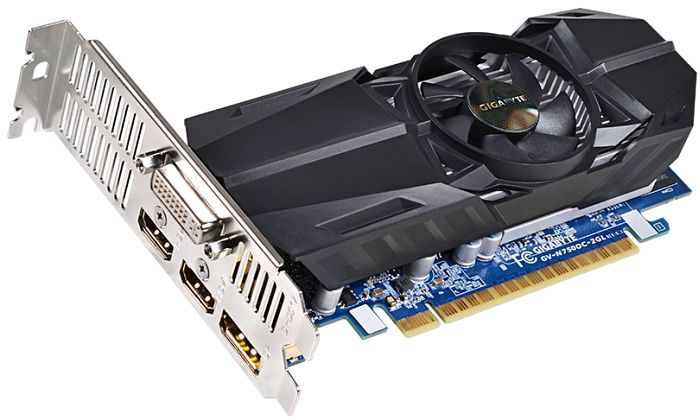 I checked trough the comparison sheets and read quite a lot of review sites before settling on the new GPU, and the GV-N950XTREME-2GD is about the biggest Gigabyte bang that I can get for my very limited bucks. Also the old board could not be SLI'ed where as this one can. I would love to have been able to finance some awesome monster GPU's, but reality like gravity sucks 
__________________
Spud
Last edited by Spudkopf; 05-07-2016 at 04:57 AM.
|
|
| Thread Tools | |
| Display Modes | |
|
|


 Linear Mode

