
|
|
|||||||
| Technical threads All discussions about technical issues |
 |
|
|
Thread Tools | Display Modes |
|
#1
 02-11-2012, 11:13 PM
|
|||
|
|||
 Help! Black Blocks on horizon! pics of problem incl.
Good evening,
I purchased the game through steam just today and I'm having problems with blocks flickering on the horizon.I have good frame rates. I have been googling and reading all day and cant find anyone with the same problem, maybe my google-fu is no good. I was hoping the good ppl here could help me out. Anyone seen this before? Is there a fix? Here is a few pics of what I'm talking about   My system specs are as follows: Intel Core2 Duo CPU E8400 3.00ghz 4 gigs ram ATI HD5770 1gig DX11 compliant video card Windows 7 Home 64 bit Catalyst Control version 2011.1205.2215.39827 I can supply any system spec info required, I'm just not sure what else to post in that regard(newb). Thanks for reading this and any input you can provide. *edit: Forgot to add that I have tried almost everything I can think of including; updating Direct-X and my video drivers and verifying the local steam files for corruption. I read about having to disable the steam overlay with ATI cards, how ever the link provided game me a 404. I disabled the steam community within the options in steam and still this problem persists. **edit2: Thanks for the input Bounder  Some more system specs, Windows 7 Home 64 bit Catalyst Control version 2011.1205.2215.39827 There is a bit of dust but its not impeding air flow, nor does any other game suffer any issues. I have tried deleting the local content and re-installing, this just made it worse. Now the install crashes and the cockpit glitches in and out. I was reading that there could be a registry corruption? I am considering reformatting my C drive as it has been quite a while. ***edit3 I spent last evening formatting my C: drive (not just re-installing windows, but using the DOS shell on the windows DVD) i completely wiped the drive due to an old Nvidea folder that should have been deleted 3 windows re-installs ago. So having reclaimed my drive and many gigs, I installed windows and all my drivers fresh and new. Then I deleted the local content of IL2:COD and re-downloaded (3rd time). The problem is now worse than ever, the black boxes are now dancing faster and are more numerous. This is quickly becoming a massive source of frustration as I don't spend 50$ lightly. I feel as though I have tried all an end user can try and feel robbed. If there is any angle I haven't covered, idea tried or, well, anything I can do to get this working, I would be grateful. Anyone ever try to return a steam game? Is that even possible? *edit4-GPU-Z Info 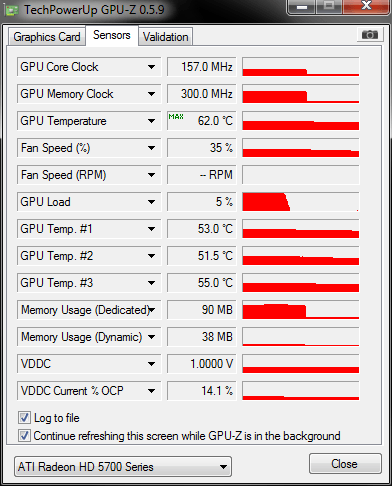
Last edited by BadPat; 02-21-2012 at 12:23 AM. 
|
|
#2
02-12-2012, 12:00 AM
|
|||
|
|||
|
Wow, not seen anything like this before. I run exactly the same graphics card as you and have an amd 3.0 dual core processor and 4gbs ram. It's not the best setup for CoD but I run the game fine on low-mid range settings and have no graphic / display distortions at all. I've not had to disable anything on my pc including anything associated with steam.
Might be worth posting full systems specs including your operating system, cataylst control version etc. I assume you don't have problems on any other game? Not sure what to suggest as it seems an odd one tbh... does the problem manifest instantly or does it appear during a flight? Also, might be a long shot but it may be worth posting what settings you are using in CoD - is the epilepsy filter on / off, how about anti-aliasing and vsync? Things that spring to mind are when you updated graphic card drivers did you delete your old ones first as I've heard this can sometimes cause problems...? What's the history of your pc - have you had it for a long time, have you replaced your graphics card and have you deleted old drivers? You could try running a program that checks for old drivers and conflicts? If it's not a software conflict could your graphics card be running hot?? Have you tried monitoring your graphics card temperatures whilst playing CoD? Also, have you checked the inside of your PC for dust build up, checked your graphics card fan is clear of dust? Hope you get it sorted, hopefully people with better computing knowledge will have a better stab at helping you. Last edited by Bounder!; 02-12-2012 at 12:38 AM.
|
|
#3
02-19-2012, 03:58 PM
|
|||
|
|||
|
Hi BadPat,
I had a read of your updated forum post, still no joy with the black blocks appearing in game. I did a google search of the problem "black blocks in game graphics" which yields a number other threads discussing this problem in a number of different games. I would suggest trying the same and reading around a bit. I think I had covered many of the suggestions from these sorts of threads - in general people suggested either driver software conflicts or hardware problems including overheating or dying / defective graphics card(s) (where the game in question was perhaps pushing the graphics card to it's limit). As I said in my previous reply, I have the same graphics card as you with a similar spec pc, so in theory it should be capable of running CoD without such problems. Something that would be useful to know and would help in diagnostics would be the nature and appearance of black blocks - namely, do they appear whenever you load the game or do they appear during the game, that is, over time? I hope other forum users can pitch in as I have limited knowledge and have never personally come across this problem before, maybe others may have a better idea as what is causing the problem. Best of luck, I know the pain and hope you can get it fixed!
|
|
#4
02-19-2012, 04:06 PM
|
||||
|
||||
|
I would bet bad card RMA it and get another.
__________________
71st Eagle Squadron www.anon6.com - Blogger on DCS Series 71st Mastiff's You-Tube " any failure you meet is never a defeat; merely a set up for a greater come back " Asus||i7x5930k||16gb3200||GTX10808gb||ATX1200Corsa ir||CBTitanium7.1||Win10x64||TrackIr4Pro/ir||gladiator pro mkII||siatekpedals||X52Throttle||G15Keyboard/RazerMouse|| 32"LCD||2x7" lilliputs,1x9inc
|
|
#5
02-19-2012, 04:24 PM
|
||||
|
||||
|
Please go to
http://www.techpowerup.com/gpuz and download the tool GPU-Z. After downloading, unpack it to a folder of your desire and run it as an administrator (!). go to the sensors tab, you should see something similar like 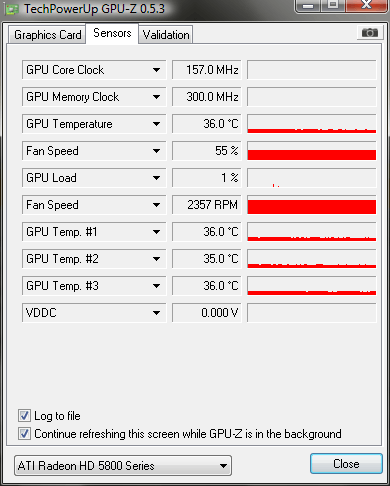 You see that black arrow next to GPU temperature, click and make sure log to file is checked (for now we only need to log temperatures, feel free to add the others later on for your own convenience). Why this is necessary, i´ll explain later. now start clod and run the black death, after completion, close clod and click that black arrow again, choose "Show Highest Reading" (and that´s why it has to be logged  ) and post its value in here or you can make a snapshot of gpu-z using the cam symbol and upload it right from there, giving you a link to post it here. ) and post its value in here or you can make a snapshot of gpu-z using the cam symbol and upload it right from there, giving you a link to post it here. I might be wrong, but it could be hardwarerelated, so we start by ruling out your GPU.
__________________
  Quote:
|
|
#6
02-21-2012, 12:22 AM
|
|||
|
|||
|
Thank you all for the info!
The problem is only when I am in the cockpit and is immediate, not over time. The blocks only flicker on the horizon, the water(which looks awesome BTW) and the sky look OK. The problem doesn't improve or worsen over time. The menus run fine. Here is the requested GPU-Z snap, thanks for the time and info FFCW Urizen. I really hope its not a hardware problem. No other game suffers any issues and I run them all at 1680x1050, including FSX. I have e-mailed Ubisoft support without answer yet. I'll keep you all posted. Thanks again!
|
|
#7
02-21-2012, 12:46 AM
|
||||
|
||||
|
Try turning Anti-Aliasing down to x 2 or even off both in the game video setup
and in Catalyst Control Center.I remeber way back this solved the problem in other games so it is worth a try.
|
|
| Thread Tools | |
| Display Modes | |
|
|







 Linear Mode

