
|
|
|||||||
| Performance threads All discussions about CoD performnce |
 |
|
|
Thread Tools | Display Modes |
|
#1
 04-27-2011, 01:20 PM
|
|||
|
|||
 ATI blue stripes
Can we get and idea on when the developers plan to tackle the ATI blue three stripes?
You know the ones you see on the horizon when flying low over water etc...  The developers so far have not mentioned them even in updates 

|
|
#2
04-27-2011, 02:13 PM
|
|||
|
|||
|
I get a single very faint line just above the horizon between 200 and 500 feet. It isn't visible above or below these heights, and is hardly noticeable (had to go and look for it after reading this post).
__________________
I'd rather be flying ... Gigabyte 990FXA-UD5 | AMD FX-8350 | MSI HD7970 TFOC-BE | 8GB Corsair DDR-III 1866 | Win8.1 Pro 64-bit
|
|
#3
04-27-2011, 02:17 PM
|
|||
|
|||
|
For me it´s very noticeable and it´s an utter immersion killer, three very bright blue lines all along the horizon going through clouds and anything.
Happens only when running the game in DX10 mode, DX9 doesnt have the blue lines. -Happens only at lowish altitudes -Happens only with Radeon cards. -Happens only running DX10 Should def be fixed asap as far as Im concerned, biggest and most noticeable bug for me right now, close second being the total failure that is AA right now (Anti Aliasing, not Anti Air). If those two things get fixed Im a happy gamer 
|
|
#4
04-27-2011, 02:22 PM
|
|||
|
|||
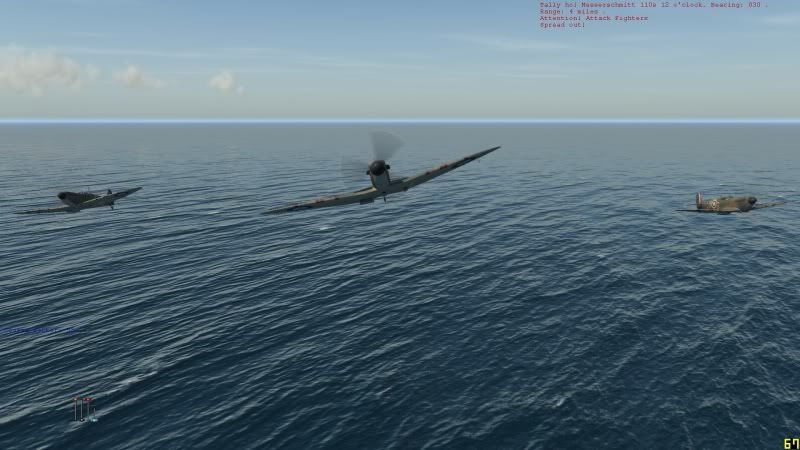 I agree that this is a stupid immersion killer. It's part of a problem with the horizon on ATi cards. The haze does not extend low enough and even at heights where the "blue line" isn't visible, there are still problems. In the picture below, for example, the haze over land means that the land fades out of view into the distance - which is correctly realised. However, there is then a sharp horizon line above and beyond the land cutting through what should supposedly be a distant haze hiding both land and the actual sharp edge of the horizon. 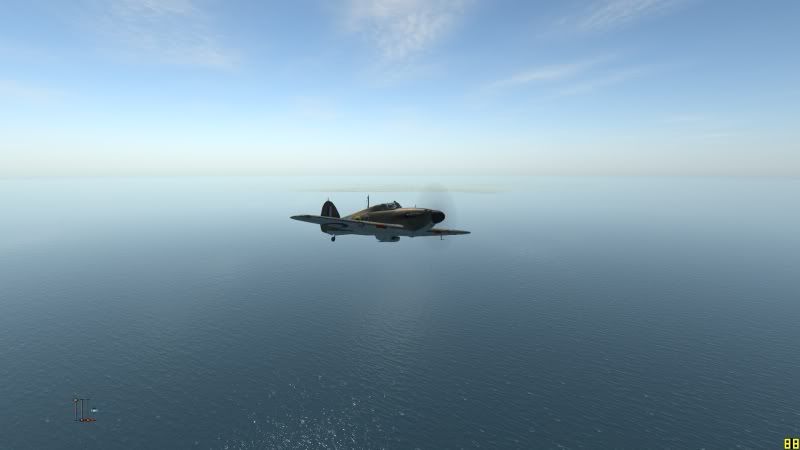
|
|
#5
04-27-2011, 02:22 PM
|
|||
|
|||
|
On another Ati-related note, i have a 4890 1Gb and while i don't get the horizon stripes, i get those strange, thin lines (artifacts) extending from coast into the sea.
I also get the issue where my clock speeds don't throttle up, they stay at 240 Mhz and that's a big part of what was causing me problems (i run an i7 920 at 2.7 Ghz with 3GB of RAM so it's not exactly shabby). I forced it to 850Mhz yesterday and i got massively improved performance, but overclocking through 3rd party software (ati tray tools) gives me some instability that results in the PC rebooting after 40 minutes or so. I think it will be perfectly playable for me once they manage to make full screen mode detectable by Ati drivers and the cards start to throttle up properly as a result, since i was even getting no less than 20-25 FPS for most of the Black Death track and up to 60 (capped by Vsync) when flying in combat over land (just not at tree top level, it still stutters a bit down low when loading textures) with quite a few of the settings in high, a couple in low, the rest in medium and SSAO off.
|
|
#7
04-27-2011, 04:19 PM
|
|||
|
|||
|
S!
The beta patch gave me too much grief so went back to latest official. Updated drivers to 11.4 and my clocks still go to full 3D speeds. Let's hope the CoD issues are noted in next driver release already 
|
|
#8
04-27-2011, 04:38 PM
|
|||
|
|||

got an sapphire 6950 black vision 2GB and yes i have those 3 blue lines but compare to other problemes this game got i cannot even bother...
|
|
#9
04-27-2011, 04:41 PM
|
|||
|
|||
|
I guess if they are there I haven't noticed them. 5870 here.
|
|
#10
04-27-2011, 05:11 PM
|
|||
|
|||
|
I am running dual HD 5970 Crossfire enabled with ati catalyst 10.11 driver, I am able to run IL-2 COD. I don't even plan on updating my driver to any new driver because installing new driver always have been pain in arse for me. Each time I install new driver, the driver itself refuse to install driver until I use window 7 driver to install driver for me. I never had problem installing driver when I had nVidia card before switching to ATI card. I fully regret buying ATI card because I always have problem installing new ATI driver. I might will upgrade to next driver when there is strong good review on new driver for ATI card.
Chaoic out...
|
|
| Thread Tools | |
| Display Modes | |
|
|


 Linear Mode

