Good evening,
I purchased the game through steam just today and I'm having problems with blocks flickering on the horizon.I have good frame rates.
I have been googling and reading all day and cant find anyone with the same problem, maybe my google-fu is no good. I was hoping the good ppl here could help me out. Anyone seen this before? Is there a fix?
Here is a few pics of what I'm talking about


My system specs are as follows:
Intel Core2 Duo CPU E8400 3.00ghz
4 gigs ram
ATI HD5770 1gig DX11 compliant video card
Windows 7 Home 64 bit
Catalyst Control version 2011.1205.2215.39827
I can supply any system spec info required, I'm just not sure what else to post in that regard(newb). Thanks for reading this and any input you can provide.
*edit:
Forgot to add that I have tried almost everything I can think of including; updating Direct-X and my video drivers and verifying the local steam files for corruption.
I read about having to disable the steam overlay with ATI cards, how ever the link provided game me a 404. I disabled the steam community within the options in steam and still this problem persists.
**edit2:
Thanks for the input Bounder

Some more system specs,
Windows 7 Home 64 bit
Catalyst Control version 2011.1205.2215.39827
There is a bit of dust but its not impeding air flow, nor does any other game suffer any issues.
I have tried deleting the local content and re-installing, this just made it worse. Now the install crashes and the cockpit glitches in and out. I was reading that there could be a registry corruption? I am considering reformatting my C drive as it has been quite a while.
***edit3
I spent last evening formatting my C: drive (not just re-installing windows, but using the DOS shell on the windows DVD) i completely wiped the drive due to an old Nvidea folder that should have been deleted 3 windows re-installs ago. So having reclaimed my drive and many gigs, I installed windows and all my drivers fresh and new. Then I deleted the local content of IL2:COD and re-downloaded (3rd time).
The problem is now worse than ever, the black boxes are now dancing faster and are more numerous. This is quickly becoming a massive source of frustration as I don't spend 50$ lightly. I feel as though I have tried all an end user can try and feel robbed. If there is any angle I haven't covered, idea tried or, well, anything I can do to get this working, I would be grateful.
Anyone ever try to return a steam game? Is that even possible?
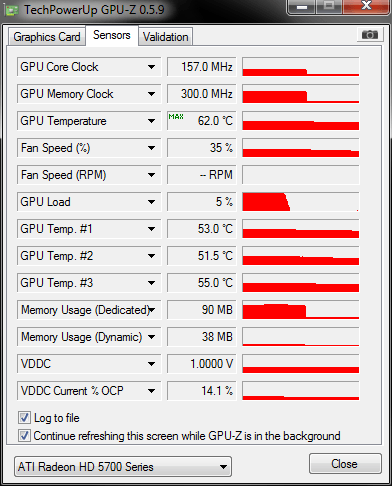
*edit4-GPU-Z Info